


Mayo Clinic
3.72.97K Reviews
App Specs
- Version
- 14.8
- Updated On
- License
- Free
- Downloads
- 1,000,000+
- Developer
- Mayo Clinic
- Categories
- Medical
- Platform
- Android, iOS
Screenshots
 Analysis by AppCompare
In a shared home, a health app can be useful without becoming a shared medical file. I’d treat Mayo Clinic as a personal reference and care-management tool, then be deliberate about who uses each device and whose information is on screen. That distinction matters most when a phone or tablet gets passed around: convenient access to general health guidance is not the same as permission to browse another person’s appointments or records.
One household, different health questions
A realistic use is a family member looking up a health question while another person is nearby. The app’s medical information can help someone prepare to discuss a concern, but I would keep the search and any personal account activity in the right person’s hands. For example, a parent might read general information about a child’s symptoms, while avoiding the assumption that the app can assess the child or replace a clinician’s advice. It is best used to organize questions and understand terms, not to make a diagnosis.
This is where Mayo Clinic differs from a general web search. A search engine can surface a wide mix of sources, and a symptom checker may steer the interaction toward a decision tree. The Mayo Clinic app is more useful to me as a source of health information connected with practical care tasks. That focus is helpful when I want a clear starting point, though it is not necessarily the quickest option if all I need is a phone number, a local urgent-care option, or emergency help.
Keep personal access personal
Before handing a device to someone else, I would close account-related screens and make sure notifications or records are not visible. A shared device can blur boundaries even when everyone in the household trusts one another; a person’s appointment details are still personal. I would also avoid treating a saved login as a family account. The app’s usefulness for one person does not mean another person should use that person’s credentials.
For a household coordinating care, a simple division of labor can prevent confusion: one person can help with logistics, while the patient remains the one who checks personal details and makes decisions. If someone is helping an older relative, for instance, they can sit together while the relative reviews information rather than assuming that shared access is automatically appropriate. This keeps the app useful without making the phone itself the family’s informal medical record.
Coordination without overpromising
Appointment management can make the app relevant to a household routine, especially when a Mayo Clinic visit needs to fit around work, school, or transportation. I’d use it to keep track of the task at hand, then confirm important arrangements through the appropriate care channel if anything is unclear. A mobile app is convenient for routine planning, but it should not be the only plan for time-sensitive medical questions.
A practical tip is to decide who is responsible for each step before an appointment: who will check the schedule, who will arrange a ride, and who will bring the questions the patient wants answered. The app may help with the appointment side, but it cannot make those household decisions for you. For people receiving care outside Mayo Clinic, an app from their own health system may be a better place for visit-specific tasks, while Mayo Clinic’s health information can still be useful as a separate reference.
Worth Reading Before You Choose

Flipboard Shows What News Apps Must Do Beyond the Feed

Switching to Android Auto Means Rethinking Your Driving Routine

Google Calendar Makes a Crowded Week Easier to Manage

Ludo King Makes the Most of the Minutes Between Plans

Baby Panda World Brings Quick Play to Modern Phones, but Its Game Library Feels Busy

ESPN’s Live Game View Makes Following Close Games Easier
Age, trust, and realistic expectations
The app is rated for Everyone, which makes it broadly suitable for people of different ages to encounter, but that rating is not a substitute for adult judgment when a child is using a shared device. I would guide younger users toward general educational reading and keep personal health accounts under the appropriate person’s control. Health content can be informative without being tailored to a child’s specific situation.
I also wouldn’t equate a familiar medical name with a guarantee that every answer fits every reader. Health guidance needs context: symptoms, medical history, and urgency all matter. If someone has severe or rapidly worsening symptoms, looking through an app is the wrong next step; they should seek appropriate urgent or emergency care. For a non-urgent question, the app can help a reader arrive at a conversation with a clinician better prepared.
As a free medical app from Mayo Clinic, it has a low barrier to trying it. Its 3.6 average across around 12,000 ratings suggests that people’s experiences are mixed rather than uniformly glowing. I’d take that as a reason to judge it by the tasks I actually need, not as proof that it will suit every phone, care situation, or household routine.
There is also a useful distinction between general information and care that is tied to a specific clinic. Someone who mainly wants broad explanations may get value from the library, while someone who needs to manage care through a different provider may prefer that provider’s app for logistics. If you are deciding whether it belongs on a shared tablet, I’d install it only if there is a clear purpose and a clear plan for keeping personal access separate.
With that household context in mind, here is how the app feels in everyday use and what I found most useful.
First Impressions and User Experience
First off, let me tell you that the Mayo Clinic app is super easy to navigate. Once you launch it, you’re greeted with a clean, friendly interface that doesn’t overwhelm you with too much information right away. You know how some apps just bombard you with pop-ups and ads? Well, thankfully, that’s not the case here.
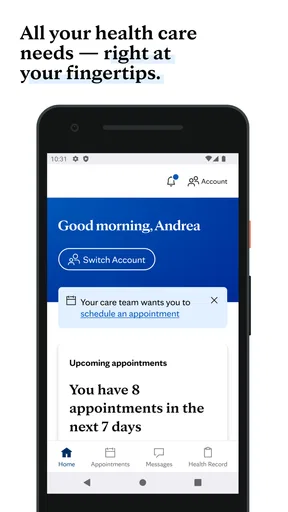
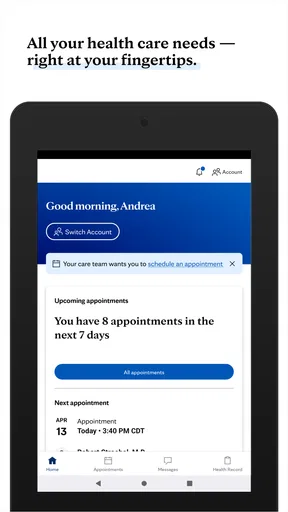
The home screen neatly displays various sections like Health Information, Appointments, and Medical Records. It’s all laid out so intuitively that even if tech isn’t your thing, you’ll find your way around without a hitch. You can easily customize the home screen to prioritize what’s most important to you, which is a nice touch.
Features Worth Highlighting
One standout feature that I absolutely love is the Health Library. It’s like having a medical encyclopedia at your fingertips. Whether you’re dealing with a pesky cold or something more serious, you can search for symptoms, conditions, and treatments with ease. The information is detailed yet easy to understand, which I find really reassuring.
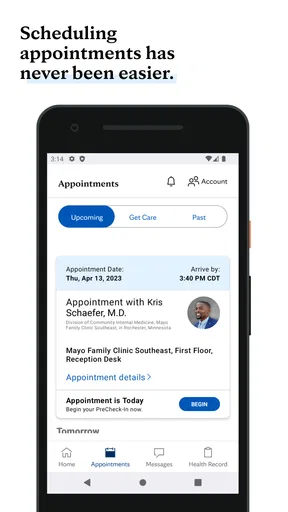
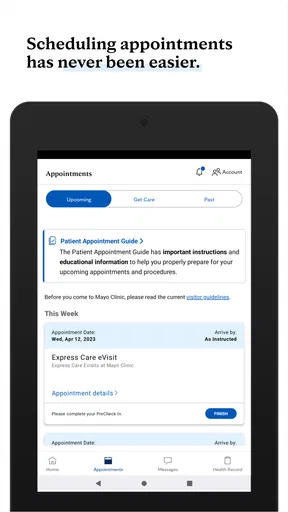
Plus, you can manage your healthcare appointments directly through the app. The scheduling feature is super handy, especially if you frequently visit Mayo Clinic facilities. You can book, cancel, or reschedule appointments without having to make a single phone call. Talk about convenience!
Personalized Health Insights
What really sets this app apart is its ability to provide personalized health insights. After entering some basic health information, the app offers tailored advice and reminders. It’s like having your very own health coach, encouraging you to stay on track with your wellness goals.
And for those who love data, the app syncs with various health trackers. Whether you're counting steps or keeping an eye on your heart rate, all your health metrics are integrated into one place. This makes it easier to get a comprehensive view of your overall health.
Privacy and Security
Let’s be real, when it comes to health information, privacy is a huge concern. The Mayo Clinic app takes this seriously. Your data is protected with top-notch security measures, so you can feel confident that your information is safe. Plus, you have the option to enable biometric login for that added layer of security.
What Could Be Improved?
Now, no app is perfect, right? While the Mayo Clinic app is pretty amazing, there are a couple of areas that could use a bit of polish. For starters, the notifications can sometimes be a little too frequent. Don’t get me wrong, I appreciate reminders, but a few less nudges would be nice.
Also, while the app is generally fast, there are moments when it takes a bit to load certain sections, especially during peak times. It’s not a deal-breaker, but worth mentioning for those who value speed.
Choosing what to rely on
One helpful way to use the library is to read with a specific question in mind, then note what remains unclear for a clinician. I find that more useful than browsing from one alarming possibility to another. General health information can explain common terms and options, but it cannot account for everything that would be learned in an individual consultation.
The same principle applies to the app’s personalized insights and tracker connections. They can make information easier to review in one place, but I would not treat a trend or reminder as a medical conclusion. If a number seems concerning, or symptoms are changing, discuss it with a healthcare professional rather than relying on an app to interpret it. People who do not track health metrics may reasonably ignore that part and still use the other tools.
For first-time setup, I’d start with only the parts I expect to use: health information for occasional reading, or appointment tools if I receive care at Mayo Clinic. Then I’d review what appears on the home screen and adjust it to reduce clutter. This is a small but useful way to keep the app focused, especially on a device that is used for more than one purpose.
The app is free, and it has been available since 2013; its current version is 14.7 and it requires Android 9 or later. Those details make it worth checking device compatibility before trying it on an older phone. It has more than one million installs, but popularity alone would not decide it for me: the key question is whether its information and care tools match the provider and routines I actually use.
Final Thoughts
In my opinion, the Mayo Clinic app is a fantastic resource for anyone looking to take charge of their health. It combines reliable medical information with practical tools to manage your health journey. Whether you’re a health enthusiast or just someone looking to keep up with medical appointments, this app has something for you.
So, if you haven’t already, give it a go. You might just find it becomes an essential part of your daily routine, helping you stay informed and proactive about your health. And really, who doesn’t want that?
Who I’d recommend it to at home
I’d recommend it most to someone who wants approachable medical reading and already has a reason to use Mayo Clinic’s care tools. It can also suit a household where one person helps another stay organized, provided the patient remains in control of their personal account and decisions. The app’s combination of information and practical tasks is more compelling for those users than either feature would be on its own.
I’d skip it as a primary health app if my care is managed elsewhere and I mainly need provider-specific messaging, records, or scheduling. In that case, the health system’s own app is likely the more direct choice for managing appointments and care. I’d also avoid relying on Mayo Clinic as a substitute for urgent medical advice or as a way to diagnose a family member from a shared screen.
For a household, my verdict is positive with one condition: use it as a personal health resource, not as a communal account. The clearest everyday benefit is having readable medical information and, for Mayo Clinic patients, appointment tools close at hand. Keep access boundaries sensible, use the information to support—not replace—professional care, and the app has a practical place in the right person’s routine.
Pros
- Comprehensive health information.
- User-friendly interface design.
- Access to expert medical advice.
- Regular updates on health topics.
- Customizable health tracking tools.
Cons
- Limited offline access to content.
- Some features require account setup.
- Occasional app performance lags.
- Limited interactive features.
- Requires stable internet connection.
FAQs for Mayo Clinic
What features does the Mayo Clinic app offer?
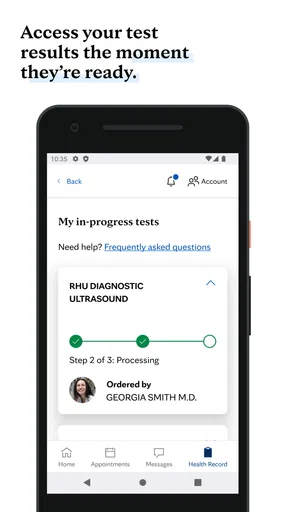
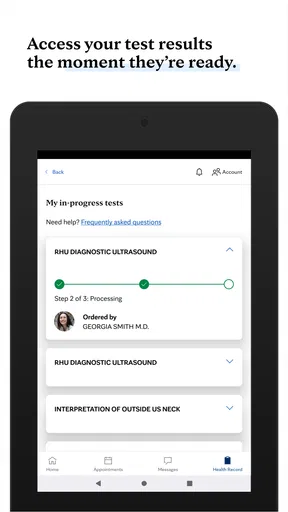
The Mayo Clinic app provides users with a wide array of features, including access to personal medical records, appointment scheduling, and secure messaging with healthcare providers. Additionally, it offers personalized health recommendations, symptom checkers, and a comprehensive library of articles and videos on various health topics. This makes it a versatile tool for managing your health on the go.
Is the Mayo Clinic app available for both Android and iOS?
Yes, the Mayo Clinic app is available for download on both Android and iOS platforms. Users can find it on the Google Play Store for Android devices and the Apple App Store for iOS devices. This ensures that a wide range of users can access the app's features regardless of their preferred mobile operating system.
How secure is the Mayo Clinic app in terms of protecting personal health information?
The Mayo Clinic app is designed with a strong emphasis on security and privacy. It uses advanced encryption methods to protect personal health information and complies with HIPAA regulations. Users can feel confident that their data is secure, as the app employs best practices in cybersecurity to safeguard sensitive information.
Can I use the Mayo Clinic app to schedule appointments with healthcare providers?
Yes, the Mayo Clinic app allows users to conveniently schedule appointments with their healthcare providers. The app offers a streamlined process for managing appointments, including the ability to view upcoming appointments, receive reminders, and even cancel or reschedule if necessary. This feature enhances the overall healthcare experience by simplifying appointment management.
Does the Mayo Clinic app provide health tracking and wellness tools?
The Mayo Clinic app includes a variety of health tracking and wellness tools designed to assist users in maintaining and improving their health. These tools allow users to monitor vital statistics, track medication, and log health data over time. Additionally, the app offers personalized wellness tips and goals, helping users make informed decisions about their health and lifestyle.


